

Wall projection systems by EyeClick
Interactive wall projectors for play, learning, and movement
Turn a plain wall into a responsive surface with motion-sensor games controlled by hands, body movement, or soft balls. Complete EyeClick systems start at $5,796 and include 350+ games and activities.
From $5,796
Published starting price
350+ activities
Games for several audiences
Wall, floor, table
Multi-surface options
20,000+ installations
Deployed in over 80 countries
GET YOUR
CUSTOM QUOTE
THE SHORT ANSWER
What is an interactive wall projector?
An interactive wall projector turns an ordinary wall into a large motion-responsive display. A projector shows the game or activity, a sensor tracks movement in front of the wall, and the software reacts in real time. Players can reach, aim, tap, gesture, or throw soft balls without using a touchscreen, controller, or wearable.
EyeClick supplies the system as one commercial package: projector, motion sensor, computer, activity library, and support. That is different from software-only platforms, where the buyer must source and calibrate compatible hardware. It also differs from large touchscreen walls because there is no electronic display surface to install at player height.
Hands and body movement
Players reach toward targets and move across the active zone while the sensor reads position and motion.
Ball-Wall play
Selected games respond when soft balls strike projected targets, adding aim, throwing, and team challenges.
No built-in screen
The wall stays a normal wall. A flat, light-colored, matte surface provides the strongest image and sensing conditions.
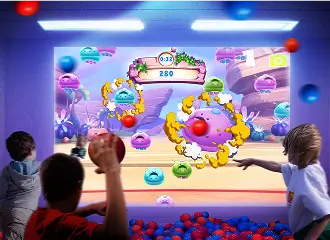
How interactive wall projection works
The projector casts content onto the wall while an optical motion sensor monitors the active area. The EyeClick software translates detected movement into game input, so projected objects respond when a player reaches or aims at them.
- A wall-facing projector creates the visual play area.
- A motion sensor detects player position and activity.
- The computer runs games calibrated for wall interaction.
- Speakers provide game audio and feedback.
- Staff select activities from the EyeClick library.
Standard wall games use hands and body movement. Ball-Wall games add soft-ball contact for sports, aiming, and group play. See the actual content in the interactive wall games library.
Interactive wall projection system: one package for wall projector games
Interactive wall projector, interactive projection wall or interactive wall system: the same hardware
Buyers may call this product an interactive wall projector, interactive projection wall, interactive wall projection system or interactive wall system. EyeClick supplies it as one calibrated package with a wall-facing projector, motion sensor, computer, speakers and activity library.
Interactive wall projection games run on a flat, light-colored, matte wall. The system does not require a touchscreen or electronic wall. The sensor responds to hands and body movement, and Ball-Wall games also respond to soft balls.
Interactive wall for kids, classrooms, therapy and seniors
For children under 5, ABC is listed for ages 2-4 on our wall games page. Kids and families have 350+ games, while schools have thousands of EyeWiz curriculum activities. EyeClick also provides activities for therapy and sensory rooms and 100+ activities for seniors.
Several games, including Bingo and Around The World, list ages up to 99, so the library includes interactive wall games for adults as well as children. EyeClick is also used in therapy and sensory rooms, where activities can be selected for reach, visual tracking, coordination and cause and effect.
Wall games your players can start with
EyeClick wall games are motion-sensor games projected onto a plain wall. Players hit projected targets, pop shapes and trace paths. These games from the EyeClick library are listed on our wall games page with their ages and player counts.
| Game | Ages | Players |
|---|---|---|
| Aliens Vs Scientists | 3-16 | 1-12 |
| Balloons | 3-11 | 1-4 |
| Bridge It | 3-7 | 1-12 |
| Baby Farm Animals | 3-99 | 1-4 |
| Basket Bounce | 3-16 | 1-6 |
| Balloons Ball | 3-99 | 1-12 |
| Bingo | 3-99 | 1-4 |
| Around The World | 3-99 | 1-6 |
| ABC | 2-4 | 1-4 |
| Big Mouth Edu | 8-16 | 1-4 |
The full library has 350+ games for kids and families, thousands of curriculum activities for schools, and 100+ activities for seniors. Content access depends on the plan in your quote.
EyeClick wall projectors and a portable alternative
BEAM and Obie support wall, floor, and table modes. BEAM Mobile is a floor and table alternative for programs sharing a system between rooms. Choose based on room size, mobility, mounting plan, and the audiences that will use the system. EyeClick reviews photos and dimensions before recommending a configuration.
| Model | Surface modes | Configuration | Best fit | Price |
|---|---|---|---|---|
| BEAM by EyeClick | Wall, Ball-Wall, floor, table | Permanent mount or stand, with flexible positioning | Multi-use schools, clinics, senior care, and entertainment spaces | From $5,796 |
| BEAM Pro Mobile by EyeClick | Floor and table (portable alternative) | Wheeled mobile system | Programs sharing floor or table activities between rooms | Custom quote |
| Obie by EyeClick | Wall, Ball-Wall, floor, table | Compact fixed installation | Classrooms, activity rooms, and smaller multi-purpose spaces | Custom quote |
Starting price does not guarantee the same final configuration for every room. Installation, mounting, shipping, taxes, and optional services can change the total. A site-specific quote is the reliable budget number.
Interactive wall vs. interactive floor
Wall and floor projection use the same basic technology, but they shape movement differently. The best surface follows the activity goal and room layout. A multi-surface system is useful when one space serves several programs.
| Decision factor | Interactive wall | Interactive floor |
|---|---|---|
| Primary movement | Reach, aim, tap, throw, and upper-body movement | Step, jump, walk, run, and whole-body movement |
| Viewing position | Front-facing and visible across the room | Viewed downward in a shared central zone |
| Good fit | Classroom fronts, gyms, therapy walls, and Ball-Wall attractions | Open classrooms, sensory rooms, clinics, activity rooms, and venue floors |
| Room requirement | Clear flat wall plus safe standing or throwing distance | Clear flat floor plus overhead or portable projection position |
| Explore | Browse wall games | Compare interactive floor projectors |
Where interactive wall projectors are used
Schools and physical education
Use curriculum activities, movement breaks, target games, and team challenges at the front of a classroom or in a gym.
Explore EyeWiz for schoolsTherapy and sensory rooms
Configure reach, visual tracking, coordination, and cause-and-effect activities around an individual therapy plan.
Explore EyeClick for healthcareSenior living
Run standing or seated activities selected for mobility, cognitive engagement, social participation, and staff-led programming.
Explore Obie by EyeClick for seniorsEntertainment venues
Add fast-reset wall and Ball-Wall attractions for indoor playgrounds, family entertainment centers, and multi-activity venues.
Explore EyePlay for entertainmentInteractive wall games for kids and play spaces
Kids play at the wall by reaching, tapping and hitting projected targets, alone or in a group. Games on our wall games page list ages from 2 to 99 and up to 12 players at once, so 1 wall can host a whole small group.
Wall play adds reach, aim and upper-body movement that complements the running and stepping of floor games. Ball-Wall games add soft-ball throwing for aim and team play.
EyeClick systems run on walls, floors and tables. Child care and preschool providers, children's ministries, play cafes and family entertainment centers use them.
Interactive wall for classrooms and schools
A projected wall at the front of the room gives teachers a standing, movement-based way to run lessons. EyeWiz activities are curriculum-aligned and project onto floors, walls and tables, so the same system can run lesson activities, movement breaks and target games.
Teachers can create lesson-aligned activities from ready-made game templates in the EyeWiz Hub, share them, and use activities other teachers created. The library holds thousands of curriculum activities.
This is not a touchscreen. A motion sensor reads hands, body movement and soft balls in front of a plain wall.
Ask about purchase orders during your quote call, and see funding options for schools.
Interactive wall for sensory rooms, therapy and special education
Wall activities can be selected for reach, visual tracking, coordination and cause and effect around an individual plan. Play is no-touch: the sensor reads body movement, so nothing needs to be pressed or held.
EyeClick systems are used in therapy and sensory rooms, and special education is one of the classroom settings they serve.
How EyeClick compares with other interactive wall options
Buyers usually compare complete multi-surface systems, dedicated wall hardware, and software-only tools. These categories are not interchangeable. Confirm the wall size, hardware included, content access, and ongoing software cost before comparing headline prices.
| Option | What it is | Surface approach | Public buying signal |
|---|---|---|---|
| EyeClick | Complete projector, sensor, computer, software, and support package | Wall, Ball-Wall, floor, and table options | Published starting price of $5,796 |
| Lü | Complete interactive audiovisual system for schools and physical activity | Fixed single-wall, fixed double-wall, and mobile wall configurations | Pricing by quote, with optional Lü+ membership |
| ActiveFloor SPORTsWall | Dedicated wall hardware with a separately selected software license | Fixed and mobile wall models, separate from floor models | Published hardware MSRP and term-based software licenses |
| LUMOplay | Interactive display software for buyers who source compatible hardware | Wall, floor, window, and touchscreen software modes | Free and annual paid software plans |
Competitor descriptions were checked against public vendor information on Aug 14, 2026. Vendor offerings can change. Sources: Lü products, ActiveFloor prices, and LUMOplay pricing.
Planning checklist for an interactive wall
Wall
Use a flat, light-colored, matte surface. Photograph the full wall and note doors, windows, outlets, and wall texture.
Clear zone
Measure the wall and the open area in front of it. Leave safe movement or throwing distance for the selected activities.
Lighting
Record windows and strong light sources. Bright ambient light can reduce projected contrast.
Mounting
Decide whether the room needs a fixed installation, a rotating multi-surface position, or a portable system.
Audience
List ages, abilities, group size, and program goals so the game library and interaction mode match actual use.
Operations
Confirm power, internet, staff access, training, support, and who will own daily activity selection.
What an EyeClick wall quote includes
EyeClick supplies the projector, motion sensor, computer and activity library as 1 calibrated system. Your quote depends on the model, the wall and room, the number of units and the support plan.
What your quote brings together
- Projector hardware built for commercial, all-day use
- Motion sensor that responds to movement on the projection surfaces supported by your selected model
- Available content libraries: 350+ games for kids and families, thousands of curriculum activities for schools, and 100+ activities for seniors
- Installation guidance for your facilities team or installer
- Warranty with the coverage period and conditions specified in your purchase documents
- Support according to the services included in your package
Confirm in your quote
- Which shipping services are included and which are charged separately; any third-party installer quote is separate.
- The content-access term, any renewal fees, and the support and warranty coverage.
- If you choose a subscription, its billing schedule, renewal and cancellation terms, and the games you can retain after it ends.
For wall use, choose BEAM or Obie. BEAM Mobile is a floor and table system.
Get a wall quoteFrequently asked questions
What is an interactive wall projector?
An interactive wall projector combines a projector, motion sensor, computer, and activity software to turn a plain wall into a responsive play or learning surface. The sensor detects hands, body movement, or ball contact while the software updates the projected activity in real time.
How much does an interactive wall projector cost?
Complete EyeClick interactive projection systems start at $5,796. The final price depends on the model, mounting or mobile configuration, room, installation, shipping, and support package. Ask for a site-specific quote before budgeting.
Do I need a special wall or touchscreen?
No touchscreen or electronic wall is required. A flat, light-colored, matte wall produces the best image. Dark, glossy, patterned, or strongly textured walls can reduce contrast or sensing accuracy, so EyeClick reviews the room before installation.
Can players use balls as well as their hands?
Yes. EyeClick supports standard wall interaction through reaching and body movement, plus Ball-Wall activities designed for players to throw soft balls at projected targets. The selected games and room setup determine the recommended interaction method.
Can one EyeClick system project on the wall and floor?
BEAM and Obie support wall, floor, and table projection. BEAM Mobile provides floor and table modes for programs that need to move between rooms. Confirm the model and room setup with EyeClick before choosing a system.
Should I choose an interactive wall or interactive floor?
Choose a wall when the activity depends on reaching, aiming, hand-eye coordination, front-of-room visibility, or ball play. Choose a floor for stepping, jumping, whole-body movement, or a shared central play zone. A multi-surface EyeClick system can support both.
Where are interactive wall projectors used?
Interactive wall projectors are used in schools, physical education spaces, therapy and sensory rooms, senior living communities, and family entertainment venues. The same hardware can run different game sets for each audience.
What ages can play interactive wall games?
Games on our wall games page list ages from 2 to 99, and each game shows its own age range and player count. ABC is listed for ages 2-4 and Bingo for ages 3-99.
How many people can play at once?
Each game lists its own player count. The games on our wall games page range from 1-4 players to 1-12 players.
How many games are there?
The library has 350+ games for kids and families, thousands of curriculum activities for schools, and 100+ activities for seniors. Content access depends on the plan in your quote.
Can teachers use an interactive wall in a classroom?
Yes. EyeWiz activities are curriculum-aligned and project onto floors, walls and tables. Teachers can create lesson-aligned activities from ready-made game templates in the EyeWiz Hub, share them, and use activities other teachers created.
Can an interactive wall be used in a sensory room?
Yes. Interactive wall projectors are used in therapy and sensory rooms, and wall activities can be selected for reach, visual tracking, coordination and cause and effect.
What is an interactive wall projection system?
An interactive wall projection system is the complete package: a wall-facing projector, motion sensor, computer, speakers and activity library. EyeClick supplies and calibrates these components as one system. Buyers also call it an interactive wall projector or interactive wall system.
Can I run projector games on wall surfaces without a screen?
Yes. The projected wall is the play surface, so no touchscreen or electronic wall is required. A flat, light-colored, matte wall gives the best image and sensing. The sensor responds to hands and body movement, and it also reads soft balls in Ball-Wall games.
Is there an interactive wall for kids under 5?
Yes. Games on our wall games page list their own age ranges. ABC is listed for ages 2-4 and several games start at age 3. Child care and preschool providers use EyeClick systems.
Are there interactive wall games for adults?
Yes. Several games list ages up to 99, for example Bingo and Around The World (ages 3-99), and the library includes 100+ activities for seniors. Each game shows its own age range and player count.
Match the wall system to your room
Send the wall dimensions, room photos, audience, and preferred activities. EyeClick will recommend the model, projection position, and configuration for a site-specific quote.
Request a quote