

How to Choose an Interactive Projector: A Complete Buyer’s Guide
Interactive projectors can transform any space into an engaging, movement-based experience - but not all systems are created equal. Whether you're designing a classroom, a healthcare environment, or an entertainment space, choosing the right solution requires understanding both the technology and how it will be used in practice.
This guide walks you through the key factors to consider, from projector types and technical specs to real-world use cases and budget planning.
Understanding Interactive Projector Systems
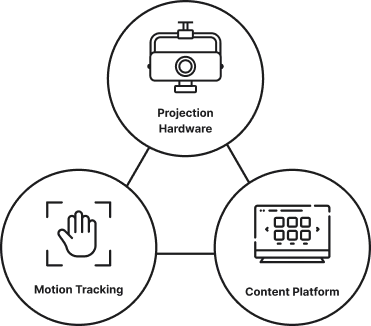
Before comparing specs, it’s important to understand that an “interactive projector” is more than just a projector. A complete system typically includes projection hardware, motion or gesture tracking, and a content platform that determines what users actually experience.
Some solutions focus mainly on the hardware, while others - like EyeClick - offer a full ecosystem that combines projection, interaction, and purpose-built content.
Types of Interactive Projection Setups
Different environments require different setups, and choosing the right type depends on how users will interact with the system.


Some advanced systems support multiple projection modes, allowing the same setup to adapt to different use cases.
Key Specs That Actually Matter
When comparing systems, it’s easy to get lost in technical details. These are the specs that truly impact performance in real-world environments:
Brightness (Lumens)
Higher brightness ensures the projection remains visible in well-lit spaces. For interactive environments, this is critical - dim projections can break immersion and reduce usability. Professional systems typically require significantly higher lumens than standard home projectors.
Projection Size and Flexibility
A larger projection area allows for more dynamic interaction and group participation. It’s important to consider not just maximum size, but how flexible the system is in adapting to different room layouts.
Tracking Technology
The quality of motion tracking directly affects how responsive and accurate the interaction feels. Advanced systems provide smooth, real-time tracking that supports natural movement, while lower-end solutions may feel delayed or inconsistent.
Durability and Reliability
Interactive systems are often used in high-traffic environments. Hardware should be designed for continuous use, with stable performance over time - not just occasional operation.
Content Platform
One of the most overlooked factors is the content itself. A strong content library, along with the ability to update and customize experiences, is essential for long-term value and engagement.
Matching the System to Your Use Case
The best system isn’t the one with the highest specs - it’s the one that fits your environment and goals.
In education, the focus is on engagement, collaboration, and adaptability to different learning levels. Systems that support customizable content and group interaction tend to perform best.
In healthcare and senior care, accessibility and adaptability are critical. The system should support different mobility levels and combine physical and cognitive engagement in a safe, intuitive way.
In entertainment spaces, the priority is impact and scalability. Large, bright projections and visually engaging content help attract attention and keep users engaged in high-traffic environments.
For multi-purpose environments, flexibility becomes key. Systems that can adapt between floor, wall, and table interaction offer significantly more value over time.
Budget Planning: Looking Beyond the Price Tag
When evaluating costs, it’s important to look beyond the initial purchase price. EyeClick systems start at $5,000, depending on the configuration and the specific needs of each project.
Lower-cost systems may seem attractive at first, but they often come with trade-offs such as less powerful hardware, limited content libraries, or reduced customization options. Over time, these limitations can lead to additional costs or lower system usage.
A higher-quality system typically includes:
- More durable hardware
- A richer and continuously evolving content library
- Ongoing support and updates
- Greater flexibility across different use cases
Together, these elements contribute to a more stable and adaptable solution over time, especially for organizations that rely on consistent user engagement.
What's the difference between basic and advanced interactive projectors?
As the market evolves, the gap between basic and advanced systems becomes more apparent. More advanced platforms integrate adaptive content, smarter interaction, and deeper customization, allowing the experience to evolve with users rather than remain static.
Systems that combine high-quality projection with intelligent, purpose-built content tend to deliver stronger results - not only in engagement, but also in real-world outcomes.
designed for different environments and use cases. These figures reflect the scale and versatility of deployments across education, healthcare, and entertainment settings.
Obie
Beam Mobile
Beam SE
Beam Pro
Key Advantages
Sleek, ceiling-mounted, fits tight spaces, best for table
Extremely portable, quick setup between rooms
Straight-ahead projection: solid in high ceilings or well-lit rooms
Largest floor image sizes
Interactive Surfaces
Floor, Table, Wall, Sandtable
Floor, Table
Floor, Table, Wall
Floor, Table, Wall
Brightness
3,000 lumens
4,100 lumens
6,000 lumens
4,000 lumens
Projection Size
From system height 9’:6’10”-8’2” X 2’3”-5’1”
10’5’’ X 6’5’’
From system height 9’:9’ X 5’11”
From system height 9’:10’6” X 6’6”
Best pick when...
You need table projection or overhead install
You must relocate frequently or avoid ceiling work
Ceilings are tall or rooms are bright
You need max image size and angled projection
Watch-outs
Lamp
-
Slightly smaller image than Pro at same distance
Needs extra space; angled projection (50 cm setback)
Obie
Key Advantages:
Sleek, ceiling-mounted, fits tight spaces, best for table
Interactive Surfaces:
Floor, Table, Wall, Sandtable
Brightness:
3,000 lumens
Projection Size:
From system height 9’:6’10”-8’2” X 2’3”-5’1”
Best pick when...:
You need table projection or overhead install
Watch-outs:
Lamp
Beam Mobile
Key Advantages:
Extremely portable, quick setup between rooms
Interactive Surfaces:
Floor, Table
Brightness:
4,100 lumens
Projection Size:
10’5’’ X 6’5’’
Best pick when...:
You must relocate frequently or avoid ceiling work
Watch-outs:
-
Beam SE
Key Advantages:
Straight-ahead projection: solid in high ceilings or well-lit rooms
Interactive Surfaces:
Floor, Table, Wall
Brightness:
6,000 lumens
Projection Size:
From system height 9’:9’ X 5’11”
Best pick when...:
Ceilings are tall or rooms are bright
Watch-outs:
Slightly smaller image than Pro at same distance
Beam Pro
Key Advantages:
Largest floor image sizes
Interactive Surfaces:
Floor, Table, Wall
Brightness:
4,000 lumens
Projection Size:
From system height 9’:10’6” X 6’6”
Best pick when...:
You need max image size and angled projection
Watch-outs:
Needs extra space; angled projection (50 cm setback)

How do I choose the right interactive projector for my space?
Choosing an interactive projector is not just a technical decision - it's a strategic one. The right system should align with your goals, adapt to your users, and continue to deliver value over time.
By focusing on real-world performance, flexibility, and content quality - not just specs - you can ensure that your investment creates meaningful and lasting impact.
By the EyeClick Team | Updated April 2026
Frequently Asked Questions
How much does an interactive floor projector cost?
EyeClick's interactive projector systems start at $5,000 and include the projector hardware, motion sensors, a full game library with 500+ games, and one year support and content subscription. The total cost depends on the model (Beam, Beam Mobile, or Obie) and the subscription tier you choose.
What’s the difference between Beam SE and Beam Pro?
Can interactive projectors work in low-ceiling rooms?
Yes. Interactive projector systems can be adapted to a variety of ceiling heights. Proper calibration and installation ensure optimal performance even in low-ceiling environments, depending on the specific model and setup.
How long does setup take?
Setup time depends on the complexity of the installation and the environment. In many cases, systems can be installed and configured within a relatively short time frame, with additional time required for calibration and content customization if needed.
What content is included?
All systems include access to a library of interactive games and experiences. The exact content available depends on the selected subscription, with each plan tailored to specific use cases.
For example, all plans include general-purpose games for fun and engagement, while specialized subscriptions - such as senior care or education - include additional content designed specifically for those environments. Content can also be updated and expanded over time.
How is it different from other interactive projection solutions on the market?
Compared to other interactive projection solutions on the market, EyeClick systems focus on a more comprehensive ecosystem that combines hardware, tracking technology, and a scalable content platform designed for long-term use across multiple environments.
What support and warranty does EyeClick provide?
EyeClick offers comprehensive support to ensure long-term performance and reliability. This includes warranty coverage for the hardware, along with ongoing technical support, software updates, and continuous content improvements. Our team works closely with customers to make sure the system runs smoothly and continues to deliver value over time.
Is training included with EyeClick systems?
Yes. EyeClick provides onboarding and training as part of the setup process, ensuring your team feels confident using the system from day one. This includes guidance on operating the system, selecting and customizing content, and best practices for maximizing engagement across different use cases.
Related articles
Let's Create Something Amazing Together
Whether you're in education, senior care, or entertainment, we're here to help transform your space with interactive technology.